Family Discounts Tab
Top  Previous  Next


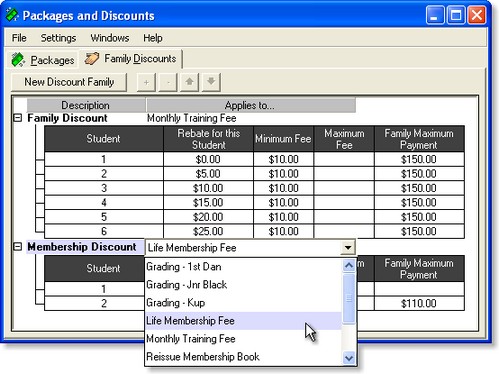
The Family Discounts Tab on the Packages and Discounts Window is used to create and manage Discounts for given fees.

familydiscounttab

On the Family Discounts tab, the following controls are available:


clip0022
The New Discount Family button creates a new discount structure that may be applied to another fee. By default, a new schedule row is created also.

clip0023
Add a new schedule row to the selected family.

clip0024 or key-delete
Delete the selected schedule row or discount family.

clip0025
Exchange the selected schedule row with the one above.

clip0026
Exchange the selected schedule row with the one below.


You can modify the Discount Family Description, the Applies To... field, or any of the Money Amounts by Double-Clicking on them.

You can change the Applies To... field by using the drop-down, or by drag-dropping a fee onto the table from the Items Window.

For information on how the fees are adjusted according to the Discount schedules, please see the section on Family Discounts.

NOTE: Discount Families and Fees can only have a one-to-one relationship. That is, you cannot assign the same discount family to more than one fee, and you can't assign two discount families to the same fee.