Martial Class™ supports special characters in students names, address, custom and many other fields.
There are several standard windows methods to input special characters. You may also rely on third party software if you wish.
Method 1. ALT key codes
Windows provides direct access to accent characters through an alt key code system. You first press the alt key and then a 4 digit code representing the character you require:
¤
|
Alt+0164
|
†
|
Alt+0134
|
×
|
Alt+0215
|
÷
|
Alt+0247
|
¶
|
Alt+0182
|
‡
|
Alt+0135
|
±
|
Alt+0177
|
—
|
Alt+0151
|
–
|
Alt+0150
|
§
|
Alt+0167
|
ˆ
|
Alt+0136
|
˜
|
Alt+0152
|
«
|
Alt+0171
|
»
|
Alt+0187
|
¦
|
Alt+0166
|
‰
|
Alt+0137
|
©
|
Alt+0169
|
®
|
Alt+0174
|
™
|
Alt+0153
|
á
|
Alt+0225
|
à
|
Alt+0224
|
â
|
Alt+0226
|
ä
|
Alt+0228
|
å
|
Alt+0229
|
Á
|
Alt+0193
|
Ã
|
Alt+0195
|
Ä
|
Alt+0196
|
Å
|
Alt+0197
|
À
|
Alt+0192
|
Â
|
Alt+0194
|
æ
|
Alt+0230
|
Æ
|
Alt+0198
|
ç
|
Alt+0231
|
Ç
|
Alt+0199
|
ê
|
Alt+0234
|
é
|
Alt+0233
|
ë
|
Alt+0235
|
è
|
Alt+0232
|
Ê
|
Alt+0202
|
Ë
|
Alt+0203
|
É
|
Alt+0201
|
È
|
Alt+0200
|
ï
|
Alt+0239
|
í
|
Alt+0237
|
î
|
Alt+0238
|
ì
|
Alt+0236
|
Í
|
Alt+0205
|
Ì
|
Alt+0204
|
Î
|
Alt+0206
|
Ï
|
Alt+0207
|
ñ
|
Alt+0241
|
Ñ
|
Alt+0209
|
œ
|
Alt+0156
|
Œ
|
Alt+0140
|
ô
|
Alt+0244
|
ö
|
Alt+0246
|
ò
|
Alt+0242
|
õ
|
Alt+0245
|
ó
|
Alt+0243
|
ø
|
Alt+0248
|
Ó
|
Alt+0211
|
Ô
|
Alt+0212
|
Õ
|
Alt+0213
|
Ø
|
Alt+0216
|
Ö
|
Alt+0214
|
Ò
|
Alt+0210
|
š
|
Alt+0154
|
Š
|
Alt+0138
|
ú
|
Alt+0250
|
ü
|
Alt+0252
|
û
|
Alt+0251
|
ù
|
Alt+0249
|
Ù
|
Alt+0217
|
Ú
|
Alt+0218
|
Ü
|
Alt+0220
|
Û
|
Alt+0219
|
ÿ
|
Alt+0255
|
Ÿ
|
Alt+0159
|
ý
|
Alt+0253
|
Ý
|
Alt+0221
|
ª
|
Alt+0170
|
Þ
|
Alt+0222
|
þ
|
Alt+0254
|
ƒ
|
Alt+0131
|
ß
|
Alt+0223
|
µ
|
Alt+0181
|
Ð
|
Alt+0208
|
º
|
Alt+0186
|
|
Alt+0149
|
„
|
Alt+0132
|
…
|
Alt+0133
|
¬
|
Alt+0172
|
¿
|
Alt+0191
|
¡
|
Alt+0161
|
¥
|
Alt+0165
|
£
|
Alt+0163
|
€
|
Alt+0128
|
¢
|
Alt+0162
|
¹
|
Alt+0185
|
²
|
Alt+0178
|
³
|
Alt+0179
|
½
|
Alt+0189
|
¼
|
Alt+0188
|
¾
|
Alt+0190
|
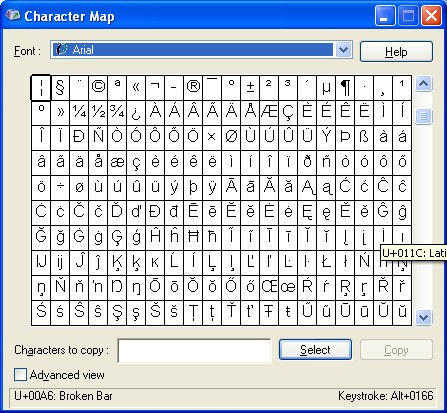
Method 2. Using the Windows Key Map
The windows key map is available through the Start windows menu (Start/Program/Accessories/System Tools/Character Map).
Method 3. Copy and Paste
This last method involves locating or generating the character you want and then copying it and pasting it into Martial Class™.
You can copy and paste characters from the above table on this page for instance (provided you are viewing it electronically of course).