The Stock Item Editor Window
Top  Previous  Next


The Stock Item Editor Window is used to configure items to appear in your inventory for sale. Stock items are generally physical items you sell. They may or may not come in different sizes.

You can bring up the Stock Item Editor Window to add a new item (or item with multiple sizes) to your catalogue by using the clip0072 New Stock item... menu option on the Items Window:
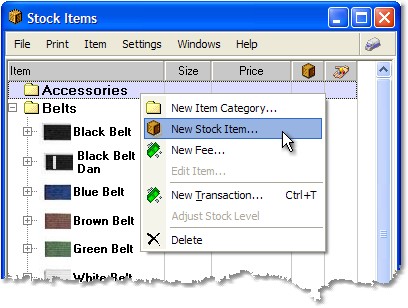
new stock item menu
Or you can edit an existing item (or items) from the same window by either double-clicking them, or selecting them and using the Edit Item... menu option.

item editor

On the Stock Item Editor Window, you can choose a Tax group that applies to this item type by using the Tax Group and Includes Tax fields.

plus
Add a new item size to this sizegroup
minus
Delete the selected item size (note: This removes the size from the sizegroup affecting ALL items using this sizegroup).
arrow-up
move the size Up the list.
arrow-down
move the size Down the list.


Item Sizes

There are 2 types of Items in the system, ones that come in different sizes and ones that do not.

When you create an item, you are able to set the clip0136 Multiple sizes checkbox. Once an item has been created, you cannot change whether it comes in multiple sizes or not. Each item size may have one or more barcodes or scan items associated with it, have different default buy and sell prices, and reorder limit/number levels.

For more information on working with item sizes in Martial Class™, please see Sizes and Size Groups in the Stock and Purchasing section.


Reorder levels and numbers

Reorder levels and numbers may be entered here against any item or item size. These values are used to report on items running low (standard low inventory report). Then you are able to create purchase orders for these items to replenish your stocks.

We chose deliberately not to auto-create purchase orders in this version as we understand you may have several suppliers for the same items. We intend to enhance Martial Class™ by adding ordering notifications and shortcuts in a future version.