The Styles Dialog
Top  Previous  Next


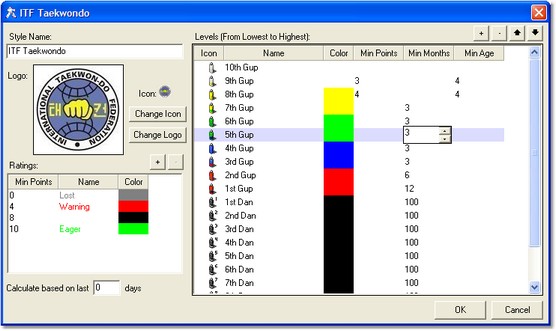
The Styles Dialog, accessible from the Options Dialog, is used to configure each style your school teaches.

styles dialog

If you teach multiple styles, each with their own belt system, you should create a seperate "style" for each.

If you have multiple stripes between belts, or different grades/belt colors for adults/children/etc, then we strongly recommend you visit the online forums at http://forum.MartialClass.com/ to read aboout how other users have configured their systems.

There are two listboxes on this window. The one on the right is used to define the ranking system for this style. The columns for this list are:

Icon
Double click this field to select an icon for this grade. There are some stock icons installed in C:/Program Files/Imagine IT/Martial Class/Icons/Belts, or you can create your own.

Name
The visible name or description for this grade.

Color
The Color field enables you to select a base color for the grade, this can be used in reporting to color code graphs or text.

Min Points
Min points is a field used to determine students recommended for grading. The value you use here should represent how many lesson points the student needs to accrue since their last grading before the system will "recommend" them for this grade.

Min Months
Min months is a field used to determine students recommended for grading. The value you use here should represent how many months should pass since their last grading before the system will "recommend" them for this grade.

Min Age
Min Age is the age (in years) before the system recommends a student for this grade.


The listbox on the left is used for rating each student based on their attendance record for this style. This number refers to the Number of lessons attended in the last x days (the period used is set in the Calculate based on last ... Days field. The columns for this list are:

Min Points
If the person has this many or more attendances (but not as much as the next level) in the last x days then this rating applies.

Name
The label to give this student for their rating.

Color
The color that the label should appear in.