


|
Understanding Owe and Pay Information
|
|
 money icon is diplayed if the student has some retained credit that has not been assigned to orders owing money.
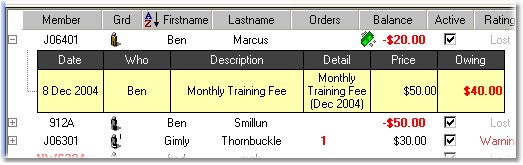
| · | Ben Smillun owes $50 and has no credit held. He needs to pay $50 to get up to date.
|
| · | Gimly Thornbuckle has $30 credit and does NOT have any orders needing payment with that credit (no money icon).
|
| · | Ben Marcus owes $20 to get up to date with his payments, but we can see from the money icon that he also has some unassigned credit. On expanding his details for outstanding payments and order items, we can see that he has an order still owing $40. As he only owes $20 to get up to date, we know he must have $20 in retained credit.
|
 NOTE: Martial Class™ does not auto-assign the credit to new payments. This is to allow the instructor and student to determine where credit is being applied. It may be that the student wishes to use that credit to pay for someone else's fees or ordered items for instance.